


Can FineVu GX35 Dual Dash Cam Track Speed and Location?
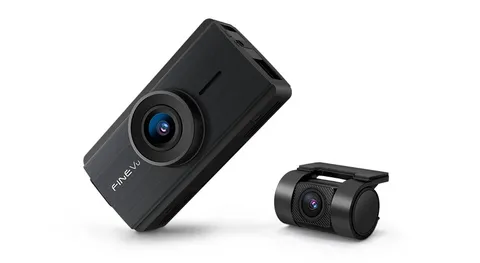
Drivers often want a dash cam that does more than record the road. They want clear video, useful trip details, and helpful alerts when something happens. This is where the FineVu GX35 Cloud becomes useful. Drivers may choose the fineVu GX35 dual dash cam QHD front & FHD rear with GPS & WiFi when they need clear video, GPS logs, and app access. It records the front and rear view, tracks speed and location with built-in GPS, and connects through Wi-Fi for app control. Also, it includes FineVu Cloud, ADAS Plus, AI HDR night vision, and power-saving parking mode. These features can help drivers review events with more context, especially after an impact, a change in motion, or road concerns.
How Built-In GPS Tracks Speed And Location
The FineVu GX35 Cloud includes built-in GPS. This means the dash cam can log speed and location while the vehicle moves. As a result, drivers can review more than video. They can also see where the event happened and how the vehicle was moving. This can help after a close call, sudden stop, or road incident. For example, the video may show the other car, while GPS data may show the route and speed. Together, these details can make the event easier to understand.
“Video shows what happened, while GPS adds where and how fast it happened.”
However, GPS signals can change in tunnels, parking garages, and areas with tall buildings. Therefore, drivers should test the feature after setup and confirm that speed and location appear correctly during playback.
Dual Cameras Give A Better Road Record
The FineVu GX35 Cloud features dual cameras for front- and rear-facing recording. The front camera records in 2K QHD (2560x1440), while the rear camera records in Full HD. Also, both cameras use STARVIS 2 technology to help improve image quality. This matters because a road event may not happen only in front of the vehicle. Sometimes, the key detail comes from behind. Therefore, the rear camera can help record tailgating, rear impacts, and traffic movement.
The front and rear setup can help drivers:
-
Record both driving directions
-
Capture more details during events
-
Review rear traffic behavior
-
Keep a clearer record during daily trips
-
Add more context to GPS data
Clearer Footage With QHD, FHD, And HDR
Good dash cam footage needs clear detail. The FineVu GX35 Cloud records the front view in QHD and the rear view in FHD. Also, it supports HDR, which helps balance the brightness and darkness in the video. This can matter in daily driving. For example, glare, shadows, tunnels, and low light can make normal footage harder to read. However, AI HDR night vision helps adjust brightness and contrast. As a result, the video may look clearer in challenging lighting conditions.
|
Feature |
Product Detail |
Driver Benefit |
|---|---|---|
|
Front Camera |
2K QHD, 2560x1440 |
Clearer front road detail |
|
Rear Camera |
Full HD |
Records rear traffic |
|
STARVIS 2 |
Front and rear camera support |
Better day and night footage |
|
HDR |
Supported standard |
Helps with glare and shadows |
|
30 FPS |
Video frame rate |
Smooth daily driving footage |
|
140° Field Of View |
Wide road view |
Captures more of the road |
These details can help drivers review footage with less confusion.
Wi-Fi And App Control Make Review Easier
The FineVu GX35 Cloud uses Wi-Fi connectivity. This allows drivers to connect their smartphones via the app. As a result, they can manage footage and settings more easily without having to remove the memory card. Wi-Fi control can help when drivers need fast access to a clip. For example, after an impact or parking alert, a driver may want to review the footage immediately. Also, app control can make setup easier because users can check the camera view from their phone.
Useful Wi-Fi and app benefits include:
-
Reviewing saved video clips
-
Checking the camera angle
-
Managing basic settings
-
Using a smartphone for control
-
Accessing footage without a computer
FineVu Cloud And Real-Time Alerts
Drivers reviewing the fineVu GX35 dual dash cam QHD front & FHD rear with GPS & WiFi can look at FineVu Cloud for parked vehicle alerts. It can send real-time alerts for impacts, motion, or power issues while the driver is away. This can be useful when the vehicle is parked outside, at work, or in a shared parking area.
“Real-time alerts can help drivers know about a parked event sooner, not hours later.”
This feature can be helpful because parking events often happen when no one is watching. A shopping cart, another vehicle, or nearby movement can create concern. Therefore, alerts may help drivers check the event more quickly. Still, cloud features may depend on setup, connection, signal, and app use. Drivers should read the setup guide carefully. Also, they should test the alerts after installation to ensure the system works as expected.
Parking Modes Help While The Vehicle Is Stopped
The FineVu GX35 Cloud includes AI parking modes with heat and battery protection. These modes include Absolute, Time-Lapse, and Power-Saving modes. As a result, the dash cam can monitor the vehicle even when parked. Parking mode can help record events when the driver is not inside the vehicle. Also, power-saving mode can help reduce battery drain. This matters because parked recording needs steady power. The included hardwire kit can help support parking mode installation. However, proper installation matters. If the wiring is not set correctly, parking mode may not work as expected.
Drivers should check these points before using parking mode:
-
The hardwire kit is installed correctly
-
Battery protection settings are active
-
The camera angle is clear
-
The memory card has enough space
-
Important clips are saved quickly
ADAS Plus Supports Driver Awareness
This feature can give lane departure and front vehicle motion warnings. These alerts may help drivers stay more aware during daily driving. ADAS Plus can be useful in traffic. For example, a front vehicle motion warning may help when traffic starts moving. Also, lane departure alerts may remind drivers to pay closer attention during long drives.
However, these alerts do not replace safe driving. They only add helpful reminders. Drivers still need to watch the road, use mirrors, and follow traffic laws. Drivers using the fineVu GX35 dual dash cam QHD front & FHD rear with GPS & WiFi may receive speed camera alerts in supported regions. Therefore, drivers should treat ADAS Plus as extra help, not a full safety system.
Product Details Drivers Should Know
The black dash cam body has a compact shape that suits placement on the front windshield. Its size is 8.5 x 12 x 8 cm, and it weighs about 350 grams. Because of its compact design, it fits neatly on the windshield without feeling bulky. The package includes the front and rear cameras, a hardwire kit, a mounting bracket, and a 64 GB SD card. Also, it supports microSD storage up to 128 GB. This matters because higher-quality video can use storage faster.
Here are the key details:
-
Brand: FineVu
-
Model name: GX35 Cloud
-
Vehicle type: Car, RV, Truck
-
Connectivity: Wi-Fi
-
Control method: App
-
Mounting type: Windshield mount
-
Field of view: 140 degrees
-
Frame rate: 30 FPS
-
Included memory card: 64 GB
-
Maximum supported storage: 128 GB
-
Warranty: 3 years
These details help buyers understand the setup before installation.
A Smarter Way To Review Every Drive
The FineVu GX35 Cloud can track speed and location through its built-in GPS. Also, it records the front view in QHD and the rear view in Full HD. These features can give drivers a clearer record of speed, location, and road events. Its Wi-Fi app control, FineVu Cloud alerts, ADAS Plus, AI HDR night vision, and parking modes add more value during daily driving and parked monitoring. However, setup still matters. Drivers should check GPS data, test the app, review camera angles, and confirm parking mode settings before relying on the footage.
With the right setup, this dash cam can help drivers review speed, location, road events, and parking alerts with more detail and less stress.