


POS Accounting for Restaurants: How to Automate Sales, Payments, and Financial Reports
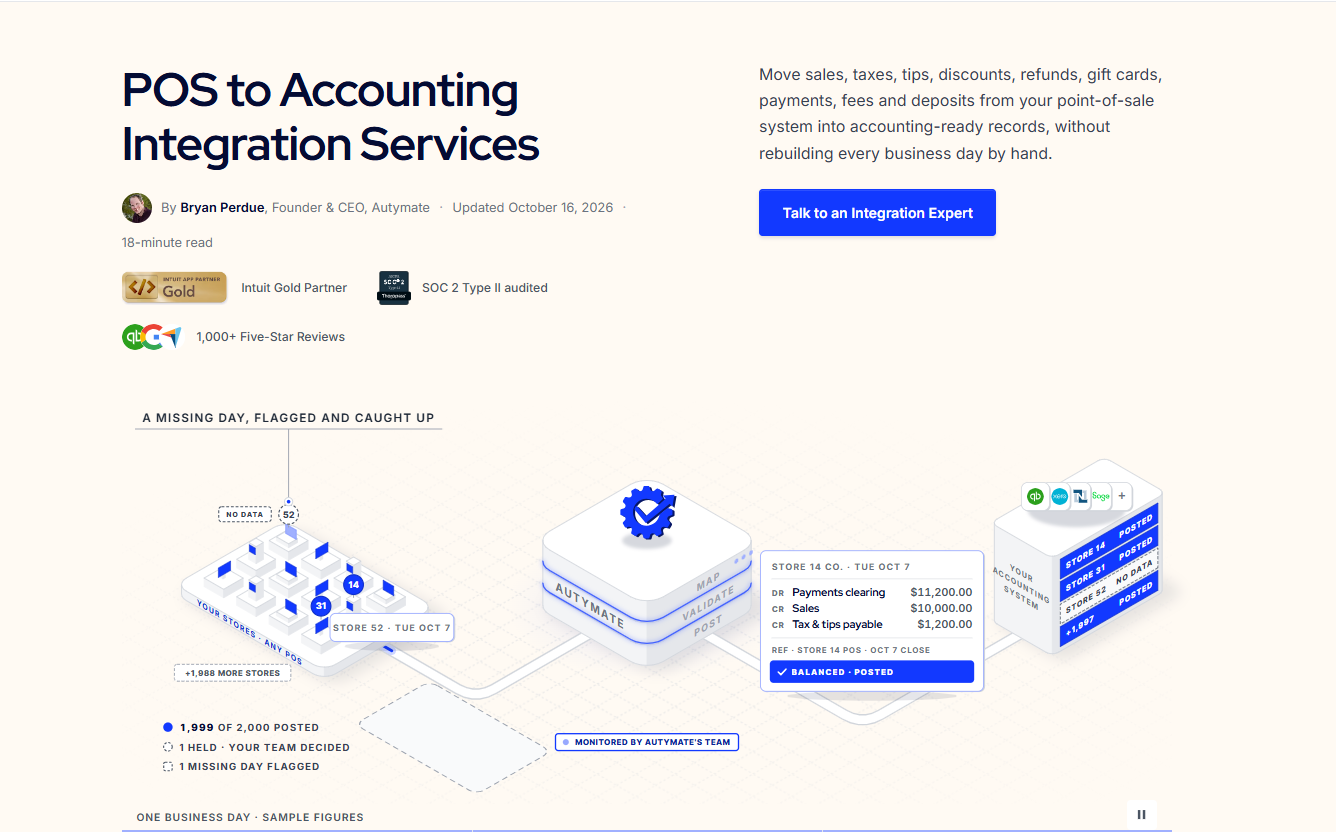
Running a successful restaurant involves much more than serving great food and providing excellent customer service. Behind every order is a financial transaction that must be recorded, categorized, and reconciled accurately.
From cash payments and credit card transactions to tips, refunds, discounts, and sales taxes, restaurants process a significant amount of financial information every day.
Managing all these transactions manually can quickly become overwhelming, especially for restaurants operating multiple locations.
That's where POS accounting for restaurants becomes essential.
By connecting a restaurant's point-of-sale (POS) system with accounting software, businesses can automate daily sales recording, simplify payment reconciliation, and maintain more accurate financial reports.
Instead of spending hours transferring sales data into QuickBooks Online or another accounting platform, restaurant owners and accounting teams can focus on financial performance and business growth.
In this guide, we'll explain how restaurant POS accounting works, its benefits, common challenges, and how automation can improve sales, payments, and financial reporting.
What Is POS Accounting for Restaurants?
POS accounting for restaurants is the process of recording, organizing, and reconciling financial transactions generated by a restaurant's point-of-sale system.
A restaurant POS system captures sales and payment activity throughout the day. This includes dine-in orders, takeout purchases, online orders, tips, taxes, discounts, and refunds.
Accounting software uses this information to maintain financial records, calculate revenue, manage liabilities, and prepare financial statements.
For example, a restaurant may generate $7,500 in daily sales.
However, this amount may include different categories such as food sales, beverage sales, sales taxes, tips, and promotional discounts.
These amounts must be classified correctly in the accounting system.
Without POS accounting integration, restaurant staff may need to export daily reports and manually enter the financial information into accounting software.
With automation, supported transaction data can move between connected systems according to predefined accounting rules.
This reduces repetitive bookkeeping work and helps restaurants maintain consistent financial records.
How Does Restaurant POS Accounting Work?
Restaurant POS accounting connects operational sales activity with financial recordkeeping.
The process generally follows five steps.
1. Recording Customer Transactions
When customers place orders and make payments, the POS system records relevant details, including:
-
Food and beverage sales
-
Cash and card payments
-
Sales taxes
-
Tips and gratuities
-
Discounts and promotions
-
Refunds and voids
-
Online and delivery orders
These records form the foundation for restaurant accounting.
2. Collecting Daily Sales Information
At the end of the day, the POS system can generate reports summarizing sales and payment activity.
These reports often separate revenue categories, payment methods, taxes, tips, and adjustments.
3. Transferring Data to Accounting Software
An integration retrieves the required financial information and transfers it into software such as QuickBooks Online, Xero, or NetSuite.
Depending on the restaurant's requirements, the integration may create individual transactions or summarized daily entries.
4. Categorizing Transactions
The integration applies accounting rules to classify revenue, taxes, gratuities, and payment information.
For example, food sales may be assigned to one revenue account, while collected sales taxes are recorded as liabilities.
5. Updating Financial Records
Once transactions are successfully processed, the accounting system reflects the restaurant's financial activity.
Accounting teams can then reconcile payments, review reports, and prepare financial statements.
Why Restaurants Need POS Accounting Automation
Restaurants face accounting challenges that are different from those of many other businesses.
A single restaurant may process hundreds of transactions daily across multiple payment methods.
These transactions can involve sales taxes, tips, discounts, third-party delivery fees, and refunds.
When this information is managed manually, accounting teams often spend valuable time correcting discrepancies and preparing financial reports.
Restaurant POS accounting automation helps reduce repetitive tasks while improving the consistency of financial data.
For multi-location restaurant businesses, automation also helps standardize accounting procedures across different stores.
How POS Accounting Automates Daily Restaurant Sales
Daily sales recording is one of the most important areas of restaurant accounting.
Without integration, employees may need to download reports, calculate totals, and manually enter information into accounting software.
Automating this workflow can significantly reduce administrative work.
Automatic Daily Sales Synchronization
Restaurant POS accounting integration can retrieve daily sales information and transfer it into accounting software on a scheduled basis.
For example, a restaurant using a compatible POS system can synchronize its end-of-day sales summary with QuickBooks Online.
Accurate Revenue Categorization
Restaurants often need to track different revenue streams.
These may include:
-
Food sales
-
Beverage sales
-
Catering services
-
Delivery orders
-
Merchandise sales
An integration can map these categories to the appropriate accounting accounts.
Refund and Discount Management
Refunds and promotional discounts affect restaurant revenue.
Automated workflows can help record these adjustments consistently, reducing the risk of inaccurate sales reports.
Multi-Location Sales Processing
Restaurant groups operating multiple locations can use automation to collect and categorize financial data from each store.
Location identifiers can be preserved to support individual restaurant reporting and consolidated financial analysis.
How POS Accounting Automates Restaurant Payments
Restaurants accept payments through several channels, including cash, credit cards, mobile wallets, online ordering platforms, and delivery services.
Each payment method may have different processing fees and settlement schedules.
When payment information is recorded incorrectly, bank reconciliation becomes difficult.
Tracking Different Payment Methods
POS accounting integration can categorize transactions according to payment type.
For example, cash receipts may be recorded separately from card payments awaiting settlement.
Managing Payment Processing Fees
Credit card processors often deduct fees before transferring funds to the restaurant's bank account.
Consider this example:
| Transaction Detail | Amount |
|---|---|
| Customer card payments | $8,000 |
| Payment processing fees | $200 |
| Net bank deposit | $7,800 |
Assuming there are no other deductions or settlement differences, the accounting system should recognize the gross $8,000 in customer payments, the $200 processing expense, and the $7,800 bank deposit.
The gross payment amount may include sales taxes and tips, so it should not automatically be treated entirely as revenue.
Simplifying Payment Reconciliation
An automated integration can help organize payment records, processing fees, and settlement information.
Accounting teams can then compare these records with bank deposits to identify discrepancies.
This makes reconciliation more manageable, although financial review remains necessary.
How Restaurant POS Accounting Improves Financial Reporting
Accurate financial reporting helps restaurant owners understand business performance.
When POS and accounting systems operate separately, reports may be delayed or incomplete.
Automated POS accounting integration can help maintain more timely financial records.
Sales Reporting
Restaurants can review daily, weekly, and monthly sales performance.
When revenue categories are mapped correctly, managers can also compare food, beverage, and other sales.
Profit and Loss Reporting
A restaurant's profit and loss statement summarizes revenue and expenses over a specific period.
Accurate POS sales data supports the revenue side of this report.
However, a complete profit and loss statement also requires expenses such as payroll, rent, utilities, inventory costs, and operating expenses.
Cash Flow Visibility
Organized payment information helps restaurants monitor the movement of funds from customer transactions to bank deposits.
This is particularly useful when payment processors settle transactions over different periods.
Location-Level Financial Reporting
Restaurant chains can use location identifiers to analyze financial performance across different stores.
This allows management to compare revenue trends and identify locations requiring additional attention.
Common Restaurant POS Accounting Challenges
Even restaurants using modern POS systems can face accounting difficulties.
Incorrect Tip Recording
Employee tips and gratuities may require separate accounting treatment depending on the arrangement and applicable rules.
Solution: Configure appropriate accounts and verify that tips are not incorrectly recognized as restaurant revenue.
Sales Tax Classification Errors
Collected sales taxes generally represent amounts owed to tax authorities.
Solution: Separate sales tax liabilities from revenue and review tax mappings regularly.
Delivery Platform Reconciliation
Third-party delivery platforms may deduct commissions, refunds, and other charges before paying restaurants.
Solution: Reconcile gross delivery activity with platform settlement statements and record commissions appropriately.
Missing Transactions
Synchronization failures or manual imports can result in incomplete financial records.
Solution: Use transaction validation, duplicate prevention, and error monitoring.
Inconsistent Multi-Location Reporting
Different restaurants may use inconsistent accounting categories or reporting procedures.
Solution: Standardize financial mappings while retaining location-specific information.
POS to QuickBooks Integration for Restaurants
QuickBooks Online is commonly used by restaurants to manage bookkeeping, expenses, and financial reporting.
However, manually entering restaurant POS information into QuickBooks can become time-consuming.
POS to QuickBooks integration helps transfer financial information between the two systems.
Depending on the POS platform and integration capabilities, restaurants can automate workflows involving:
-
Daily sales summaries
-
Revenue categorization
-
Sales tax recording
-
Refund and discount entries
-
Payment method tracking
-
Processing fee information
-
Location-level accounting data
Before implementing an integration, restaurants should confirm how the workflow handles gratuities, gift cards, delivery payments, and settlement differences.
Correct configuration is essential for accurate restaurant financial records.
Benefits of Restaurant POS Accounting Automation
1. Saves Accounting Time
Automation reduces repetitive tasks such as downloading sales reports and manually entering transactions.
2. Improves Financial Consistency
Standardized accounting rules help ensure that transaction information is categorized consistently.
3. Simplifies Payment Reconciliation
Organized payment data makes it easier to compare POS transactions, processor settlements, and bank deposits.
4. Supports Faster Reporting
Scheduled sales synchronization can reduce delays in financial reporting.
5. Helps Multi-Location Restaurants Scale
Automated integrations can support growing restaurant groups without requiring manual bookkeeping processes to expand at the same rate.
Best Practices for Automating Restaurant POS Accounting
To achieve reliable accounting automation, restaurants should follow several important practices.
Standardize accounting categories. Establish clear accounts for food sales, beverage sales, sales taxes, tips, discounts, and fees.
Choose the right synchronization method. Determine whether detailed transactions or summarized daily entries best support the restaurant's accounting needs.
Reconcile payments regularly. Compare POS reports, payment settlements, and bank deposits.
Monitor integration errors. Review failed transfers and resolve missing or incorrect transactions.
Maintain location-level records. For restaurant groups, preserve store identifiers to support accurate financial reporting.
Review financial reports. Use updated accounting records to monitor performance, identify discrepancies, and make informed business decisions.
How Autymate Helps Restaurants Automate POS Accounting
Restaurant accounting becomes increasingly complicated when businesses manage multiple locations, payment methods, and financial systems.
Autymate helps restaurants connect their POS systems with accounting applications and automate financial data workflows.
Through its POS-to-accounting integration services, Autymate helps businesses reduce manual data transfers and establish more consistent accounting processes.
Depending on the connected platforms and implementation requirements, workflows can support:
-
Daily restaurant sales synchronization
-
Revenue and accounting account mapping
-
Sales tax, tip, and refund categorization
-
Payment and settlement data transfers
-
Multi-location restaurant accounting
-
Transaction validation and error monitoring
-
Custom accounting integration requirements
For restaurant groups and franchises, these capabilities can help simplify financial operations while preserving the information required for store-level and consolidated reporting.
Rather than replacing existing POS systems, Autymate focuses on connecting business applications and automating repetitive financial workflows.
Explore Autymate POS to Accounting Integration Services to learn more.
Final Thoughts
Restaurant accounting involves more than recording daily sales.
Businesses must accurately manage revenue, taxes, tips, refunds, payment settlements, and financial reports.
When these processes rely on manual work, accounting becomes more complicated as transaction volumes increase.
POS accounting for restaurants helps automate daily sales recording, organize payment information, simplify reconciliation, and support accurate financial reporting.
By connecting restaurant POS systems with accounting software, businesses can reduce repetitive tasks and establish more efficient financial workflows.
Whether you operate a single restaurant or a growing franchise, the right integration can make financial management easier.
Ready to automate restaurant POS accounting?
Discover how Autymate can help connect your restaurant POS system with accounting software and simplify financial operations.
Frequently Asked Questions (FAQs)
What is POS accounting for restaurants?
POS accounting for restaurants involves recording and reconciling financial transactions generated by restaurant POS systems, including food sales, beverage sales, tips, taxes, refunds, and payments.
Can restaurant POS accounting be automated?
Yes. Restaurants can use compatible integrations to automate the transfer of sales and payment information into accounting software.
How does POS accounting integration help restaurants?
It reduces manual data entry, supports consistent accounting classifications, simplifies payment reconciliation, and helps maintain updated financial records.
Can restaurant POS systems integrate with QuickBooks Online?
Yes. Many restaurant POS platforms can connect with QuickBooks Online through compatible native, third-party, or custom integrations. Available features vary by platform.
How does POS accounting handle restaurant tips?
POS accounting systems can track tips separately from sales revenue. The correct accounting treatment depends on whether the amounts belong to employees, the restaurant, or another party under applicable arrangements.
Is POS accounting automation useful for restaurant franchises?
Yes. Automation helps franchises standardize financial workflows, organize transaction data across locations, and support centralized reporting.