


The Complete Guide to Dispensary Business Cards and Sales Floor Displays
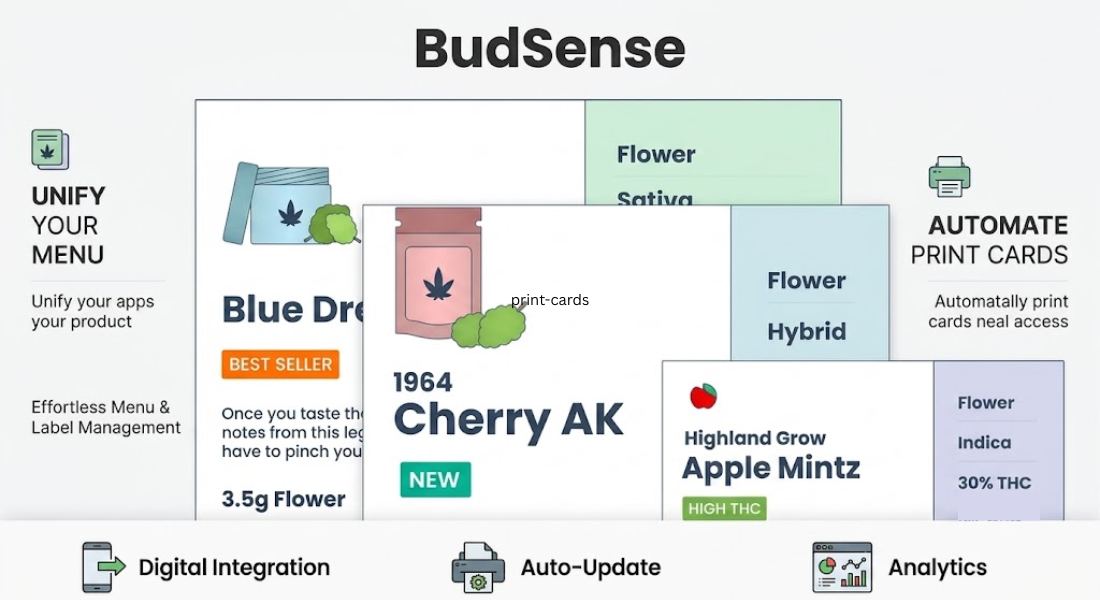
Show me products, and I’ll study them. Tell me about deals, and I may not hear you. When it comes to cannabis retail, print always wins.
Whether you’re capturing window shoppers with eCommerce websites and digital menu boards or trying to close the deal on the sales floor, tangible mediums are what many customers use to make their purchasing decisions. Between studying paper strain charts while shopping display cases and budtenders referencing trim scales and pricing metrics at checkout, printed marketing material impacts sales.
For cannabis retailers who want to level up their display game, dispensary business cards and product cards are the perfect solution. Clean branded cards connect your digital flower menu with the physical touchpoints that your customers use to learn about cannabis. Instead of making price the focus, nicely formatted displays can educate customers on key strain characteristics and create a memorable brand experience at checkout.
In this ultimate guide, we cover everything from the history of dispensary print displays to how automated merchandising platforms work, why accurate displays matter, and how dispensaries can automate their merchandising workflow daily.
History of Dispensary Print and Display Sets
It used to be that dispensaries had only two options when producing paper signage, labels, or informational pamphlets: handwrite everything on paper or construct makeshift signs using Microsoft Word or Google Docs. Sure, these tactics worked well enough in the early stages of legal dispensaries, but they cause massive headaches down the road:
-
The Daily Hustle: Strains sell out, new orders arrive, and prices change constantly. Re-formatting documents and price labels from scratch each day is incredibly inefficient.
-
Looks Clownish: Unless you’re a design nerd, office productivity suites weren’t made for building clean layouts. DIY text templates often feature uneven fonts, awkward kerning, and sloppy branding.
-
Takes Away From Budtender Time: Most budtenders have spent way too much time tidying up spreadsheets or rewriting individual labels that could be spent more efficiently training customers.
Automated print and display sets help solve these issues by connecting to your dispensary POS system. Having displays that automatically update based on your live inventory means customers won’t get angry when something is sold out, and staff won’t have to spend their shifts manually editing documents.
How Automated Cannabis Display Sets Work
Menu automation is precisely what it sounds like: software that pulls your menu items, prices, strain profiles, and branding into easy-to-print layouts. Many software providers offer automation solutions tailored specifically for cannabis retailers.
Rather than relying on Word or Paint, cannabis dispensary automation platforms tie directly into your existing inventory management software. If your warehouse runs out of Bio Power, the system can automatically remove it from your display set or mark it as sold out so customers don’t try to add it to their carts.
Here are a few parts of what makes up an automated print setup:
-
Software: Think of this as the dashboard where merchants can pick paper layouts, schedule printings, and customize their branding from any web-enabled device.
-
Templates: Custom displays that plug directly into your dispensary’s point-of-sale system, ensuring your prices and inventory counts are always accurate.
-
Layouts: Built-in designs meant to logically organize your flower, concentrates, edibles, tinctures, accessories, and more.
Why Accurate Physical Displays Are Important
Most stores go through literal shelves of inventory every week, if not day. There’s no excuse for having outdated sales floor displays or display cards.
Here are just a few reasons why keeping your printed marketing material updated is beneficial to your business.
1. Avoid Losing Sales
I’ll never forget my first day at a dispensary. I shuffled up to the register with a bag of weed after spending 30 minutes examining print displays on the sales floor. When I went to pay, my budtender apologetically told me my selection was sold out. I should have known better than to trust a print display that wasn’t updated.
2. Promote Bundle Sales and New Shipments
Maybe you just got a new shipment of loosey boxes, or perhaps your extractor needs help moving some new isolate. Automatically generating special promotional displays, daily deals, or custom merch tags takes seconds with the right software.
3. Give Your Employees Back Their Time
If your print layouts update themselves, employees will no longer have to waste their time formatting spreadsheets or word documents. Instead, your team can invest that time into what really matters: customer education.
How to Manage High Strength Cannabis Inquiries
One downside of informative sales floor displays is that cannabis consumers will inevitably have questions about your products. Whenever I’m perusing the sales floor and analyzing detailed marketing cards, my curiosity gets the best of me and I bombard my friendly budtender with questions. As budtenders, how can we educate customers while also promoting responsible sales when it comes to high-strength cannabis? Here are a few tips:
-
Highlight Potencies: From a distance, your physical displays should be able to clearly define if a product is high strength or not. Make sure THC% and CBD% are visible on layouts so customers can weed out (pun intended) products they don’t want to buy.
-
Promote Starting Low: It’s always a good idea to remind consumers to start low and go slow, especially when browsing high THC concentrates or otherwise potent cannabis flower. Consider adding reminders to your merchandising tags to ensure customers have the best experience possible.
-
Educate and Empower Customers: Instead of telling your customers how to consume your products, let them know what’s in it. From cannabinoid profiles to dominant terpenes, more information on your printed marketing materials allows customers to decide for themselves.
Conclusion
While the cannabis customer journey may begin online, many purchasing decisions are solidified after viewing printed marketing materials on the sales floor. Rather than relying on outdated clipboards and DIY labels, automated menu printing allows dispensaries to focus on what matters: providing excellent customer service and offering the best cannabis products possible.
Learn how to automate your merchandising efforts and keep all of your displays synced up at once by visiting BudSense and learning about BudSense Solutions.
Frequently Asked Questions
How do automation programs integrate with physical printers?
Automation software ties into your existing point-of-sale software. When printing physical menus or displays, automated software pulls live inventory from your database and places it into a printed layout.
Why should dispensaries use automation programs instead of Microsoft Word?
Microsoft Word isn’t made for automatically populating strain information. Automation software interfaces with your existing inventory management tools, ensuring customers won’t see dead ends.
Can printing layouts be customized to my store’s brand?
Absolutely! Most software allows you to utilize your exact brand fonts, colors, and logos when generating printed displays.
How often should dispensaries be updating printed displays?
Ideally, cards should be updated daily to reflect any major inventory or pricing changes. That way, your shelves and customer information are always in sync.

