


Zoho CRM in 2026: Why Customization Needs Architecture, Not Just Automation
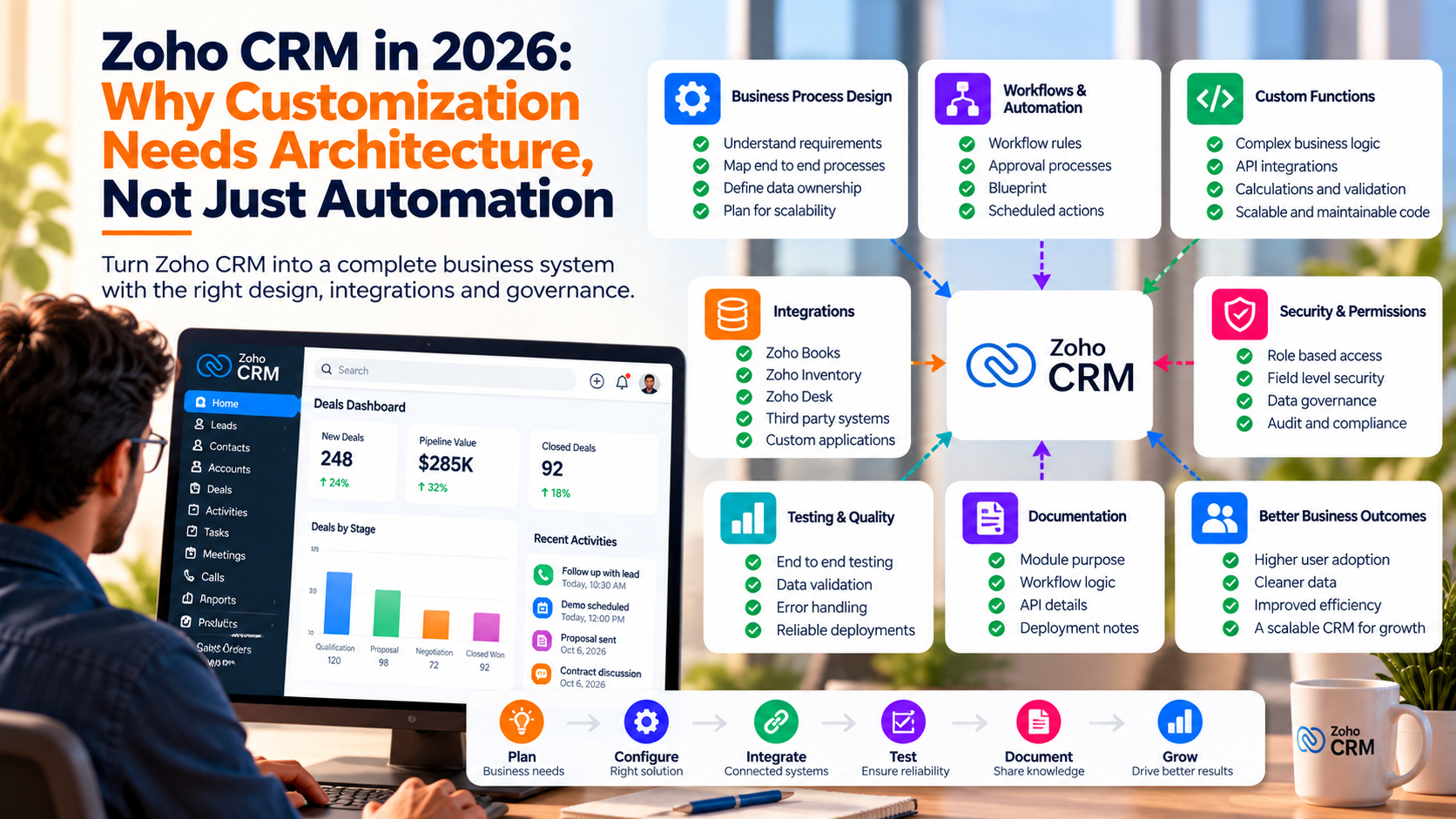
Zoho CRM can now support far more than lead and deal management.
Businesses use Zoho across sales, finance, support, operations, reporting, approvals, portals, and custom applications. As more processes move into the same ecosystem, customization becomes a larger engineering responsibility.
That is why Zoho Development Services & Customization increasingly needs to begin with architecture. Workflows, functions, APIs, permissions, modules, and integrations all need clear ownership if the CRM is expected to remain maintainable as the business grows.
Customization Should Start With the Business Process
A common mistake is starting with the feature request.
For example:
We need an automation when a deal reaches proposal stage.
Before building the workflow, the team should define:
- Who owns the deal at that stage
- Which fields must be complete
- Whether approval is required
- Which external systems need the update
- What happens when information is missing
- Which users should receive notifications
- What should happen if the automation fails
These decisions determine the right implementation.
The final solution may involve a workflow, Blueprint, custom function, API, approval process, or a combination of several options.
Native Configuration Should Be Used Where It Fits
Zoho offers several native ways to automate business processes.
Examples include:
- Workflow rules
- Assignment rules
- Approval processes
- Blueprint
- Validation rules
- Scheduled actions
- Field updates
These options are often easier to maintain than custom code.
A simple rule such as assigning a lead based on territory may not require a custom function.
Native configuration also makes the process easier for administrators to understand later.
Custom Functions Need Clear Boundaries
Custom functions become useful when the business rule is more complex.
They can handle:
- Advanced calculations
- Record transformations
- Cross module logic
- API requests
- External integrations
- Multi step processing
The important part is knowing when to stop adding logic into one function.
A function that handles pricing, notifications, API synchronization, and approval logic becomes harder to test and maintain.
Smaller responsibilities usually create a cleaner system.
Integrations Need One Source of Truth
Zoho CRM rarely operates alone.
A business may also use:
- Zoho Books
- Zoho Inventory
- Zoho Desk
- Zoho Creator
- Shopify
- ERP platforms
- Payment services
- Marketing tools
- Custom databases
When the same information exists in several systems, ownership needs to be explicit.
For example:
CRM owns: Sales status
ERP owns: Inventory quantity
Books owns: Invoice status
Support system owns: Ticket status
Without clear ownership, one system can overwrite valid information from another.
Permissions Are Part of the Architecture
Customization also affects access.
A finance user may need billing information.
A salesperson may need account and opportunity data.
A manager may need approval rights.
A support employee may need customer information without access to commercial fields.
Permissions should reflect these responsibilities.
Broad access may simplify setup at the beginning, but it creates governance and security problems later.
Error Handling Should Be Designed Before Launch
Automations fail for ordinary reasons.
An external API may be unavailable.
A required value may be missing.
A record may contain unexpected information.
A connection may expire.
A good customization plan should define:
- How failures are recorded
- Whether the action should retry
- Who should be notified
- Whether the record can continue
- How the failed action can be recovered
This becomes especially important when CRM automation triggers financial or customer facing actions.
Testing Should Cover Complete User Journeys
Testing one workflow at a time can miss problems between processes.
Suppose the business flow is:
Lead → Deal → Approval → Quote → Invoice → Customer
Each individual automation may pass its own test.
The full journey may still fail because data is lost between stages or one integration expects a field that another workflow does not populate.
Testing should therefore include complete business scenarios.
Documentation Reduces Future Development Cost
A customized CRM becomes harder to maintain when nobody remembers why previous decisions were made.
Useful documentation should cover:
- Module purpose
- Important custom fields
- Workflow responsibilities
- Custom functions
- API connections
- Data ownership
- User permissions
- Approval rules
- Error handling
- Deployment notes
This gives future developers and administrators context before they change anything.
AI Can Speed Development, Context Still Matters
AI can help developers draft functions, review scripts, create API logic, and understand unfamiliar code faster.
The tool does not automatically know the business rules behind the CRM.
For example, AI may generate a technically valid update to a customer field without knowing that the same field is controlled by an ERP integration.
That is why business context remains essential during Zoho development.
Good Zoho Customization Should Reduce Complexity
The goal of customization should not be adding as many features as possible.
The better goal is creating a CRM where:
- Users know what to do
- Data has clear ownership
- Automation behaves predictably
- Integrations remain reliable
- Permissions match responsibilities
- Failures can be diagnosed
- Future changes remain manageable
That requires planning before implementation.
Zoho CRM gives businesses many ways to customize their processes.
The stronger implementations use those options selectively and structure them around clear business rules.
That is what turns a customized CRM into a maintainable business system.

