


How Unicode Text Styling Works: A Practical Guide to Fancy Fonts in Your Social Media Bios
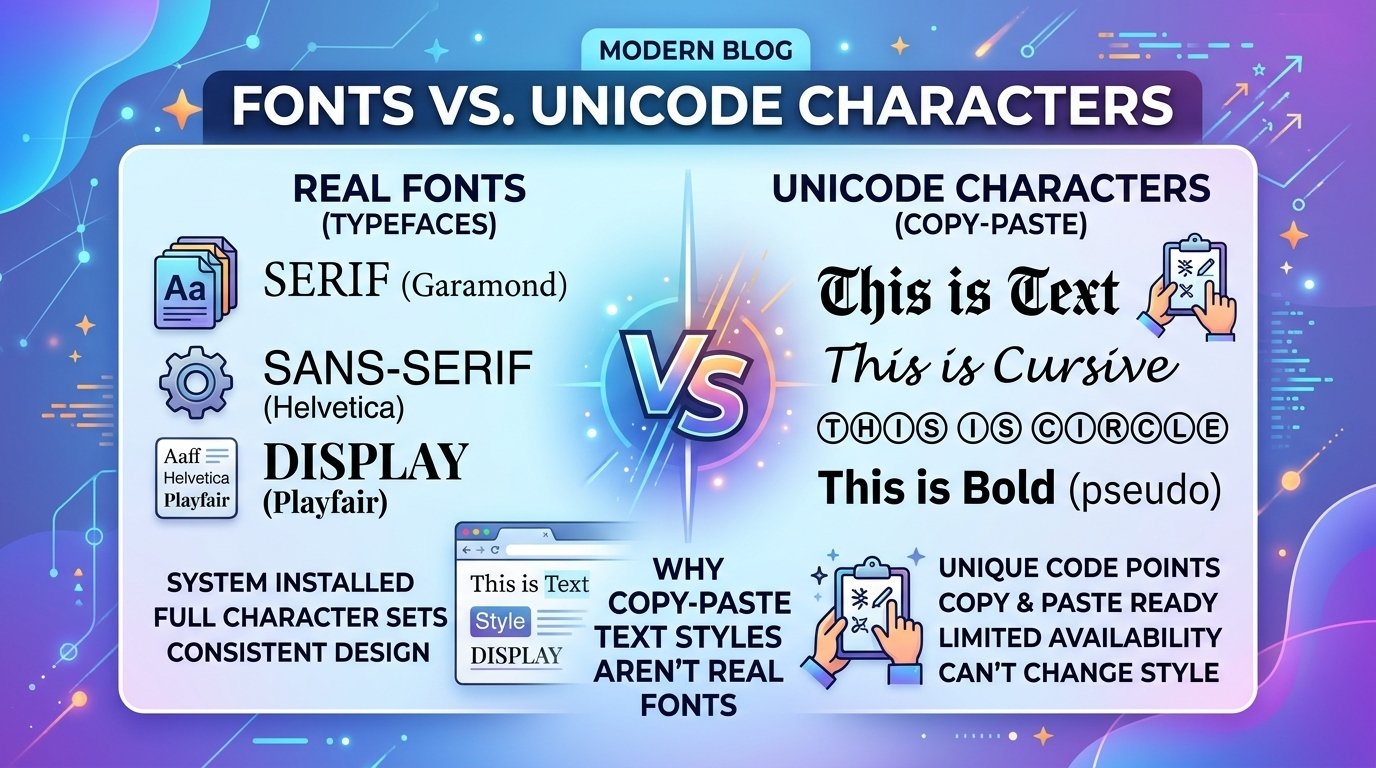
Scroll through Instagram, TikTok, or X for a few minutes and you’ll notice something: some usernames and bios look different. Letters appear curled, bold, outlined, or stacked in decorative shapes that standard keyboards can’t produce. Many people assume these are special fonts installed on a phone. In reality, the explanation is more interesting and sits at the intersection of character encoding, platform design, and visual communication.
This guide explains how styled text works, why it renders almost everywhere, where it helps, and where it can cause problems.
Fonts vs. Characters: The Distinction That Explains Everything
Most people use the words “font” and “character” interchangeably, but they are different things.
- A font is a design applied to characters. Changing a font in a word processor changes how the same underlying letters look.
- A character is a unit of text stored as a numeric code point. The letter “A” is one character, regardless of how it is drawn.
Social media platforms generally don’t let users pick fonts for bios or usernames. Every account’s text is displayed in the platform’s own typeface. So how do some bios still look different? Because the styled letters are not fonts at all. They are entirely separate characters that happen to resemble stylized versions of regular letters.
The Role of Unicode
Unicode is the universal standard that assigns a unique code point to letters, numbers, symbols, and emoji across virtually every writing system. The Unicode Consortium maintains the standard, which now covers well over 150,000 characters.
Within that huge catalog is a block called Mathematical Alphanumeric Symbols. It was originally designed so mathematicians and scientists could represent variables in different typographic styles, such as bold, italic, script, fraktur, and double-struck. A bold “𝐀” in a physics paper needed to be distinct from a regular “A”, so the standard gave it its own code point.
Because these symbols are part of Unicode, any device with Unicode support can display them. That is why a stylized bio typed on one phone appears correctly on another, with no font installation required.
Common Styles and What They Look Like
Here are the most widely used categories of styled text:
- Bold and italic variants: Heavier or slanted versions of the Latin alphabet, such as 𝗯𝗼𝗹𝗱 and 𝘪𝘵𝘢𝘭𝘪𝘤.
- Script and cursive styles: Flowing, handwritten-looking letters such as 𝒮𝒸𝓇𝒾𝓅𝓉.
- Gothic or blackletter: Medieval-inspired lettering such as 𝔊𝔬𝔱𝔥𝔦𝔠.
- Double-struck: Outlined, hollow-looking letters such as 𝔻𝕠𝕦𝕓𝕝𝕖.
- Monospace: Typewriter-style letters of equal width, such as 𝚖𝚘𝚗𝚘𝚜𝚙𝚊𝚌𝚎.
- Enclosed and decorative forms: Letters inside circles or squares, or wrapped with small symbols.
Each of these exists as a distinct set of code points, so converting normal text into one of these styles means swapping each letter for its counterpart in the target set.
Why Manual Conversion Isn’t Practical
You could technically copy styled letters one at a time from a Unicode character chart, but that would be painfully slow for anything longer than a few words. This is why people rely on converter tools. A Fancy Text Generator automates the character mapping: you type plain text, and it outputs the same message using the corresponding Unicode characters, ready to copy and paste into a bio, caption, or comment.
The process is simple, but understanding what happens behind the scenes helps you use styled text more thoughtfully.
A Closer Look at Cursive and Script Lettering
Of all the decorative categories, handwriting-inspired styles are probably the most popular, especially for aesthetic profiles, wedding invitations shared online, and lifestyle branding. Script characters carry a softer, more personal tone than the clean sans-serif lettering that dominates most apps.
A Cursive Text Generator works on the same principle as other converters, mapping standard letters to the script or bold-script blocks within Unicode. One practical detail worth knowing is that the script block has a few gaps in the original mathematical set, because some letters were already encoded elsewhere in Unicode for other purposes. Good converters handle those exceptions quietly, which is why the output looks consistent from A to Z.
Where Styled Text Works Well
Decorative text is best used with restraint. These are the situations where it tends to work:
- Short bios and taglines. A single stylized word or name can add personality without hurting readability.
- Display names. Because these are short and often meant to stand out, styling can help them catch the eye.
- Section dividers and headings in captions. A styled heading can visually separate parts of a long post.
- Creative and aesthetic profiles. Artists, designers, and hobby accounts often use it as part of a cohesive visual identity.
Limitations and Risks to Consider
Styled Unicode text is not a perfect substitute for real typography. Before using it widely, keep these drawbacks in mind.
Accessibility
Screen readers often handle these characters poorly. Instead of reading “Hello” as a word, a screen reader may announce each symbol by its formal name, such as “mathematical bold capital H.” For users who rely on assistive technology, a long styled paragraph can be nearly impossible to follow. Reserve decorative text for short phrases, and never use it for essential information such as contact details or instructions.
Searchability
Search engines and platform search bars generally treat styled characters as different from standard letters. A username written in script may not appear when someone searches for its plain-text equivalent. If discoverability matters, keep your handle and any important keywords in regular text.
Inconsistent Rendering
While support is broad, it isn’t universal. Older devices, certain apps, and some operating system versions may display empty boxes (often called “tofu”) or question marks in place of unsupported characters. It is always smart to preview styled text on more than one device.
Readability
Ornate styles such as blackletter look striking in small doses but become tiring to read in longer passages. A good rule is to style only what you want people to notice, and leave the rest in normal text.
Practical Tips for Using Styled Text Well
- Keep it short. A few words are enough to make an impression.
- Stay consistent. Choose one or two styles for a profile instead of mixing five.
- Protect key information. Put names, links, and keywords in plain text.
- Test across devices. Check how it looks on both iOS and Android, and on desktop.
- Think about your audience. A playful style may suit a creative account but feel out of place on a professional profile.
The Bigger Picture
The popularity of styled text on social platforms reflects a broader desire for self-expression within tightly standardized interfaces. When apps limit font choices, users find workarounds, and Unicode, originally built for scientific notation and global language support, happens to offer a rich set of them.
Understanding that these are characters and not fonts makes it easier to use them wisely. Used sparingly and with accessibility in mind, styled text can add personality to a profile. Used carelessly, it can make content harder to find, read, and hear. As with any design choice, the best results come from knowing both what the tool can do and where it stops being helpful.

